
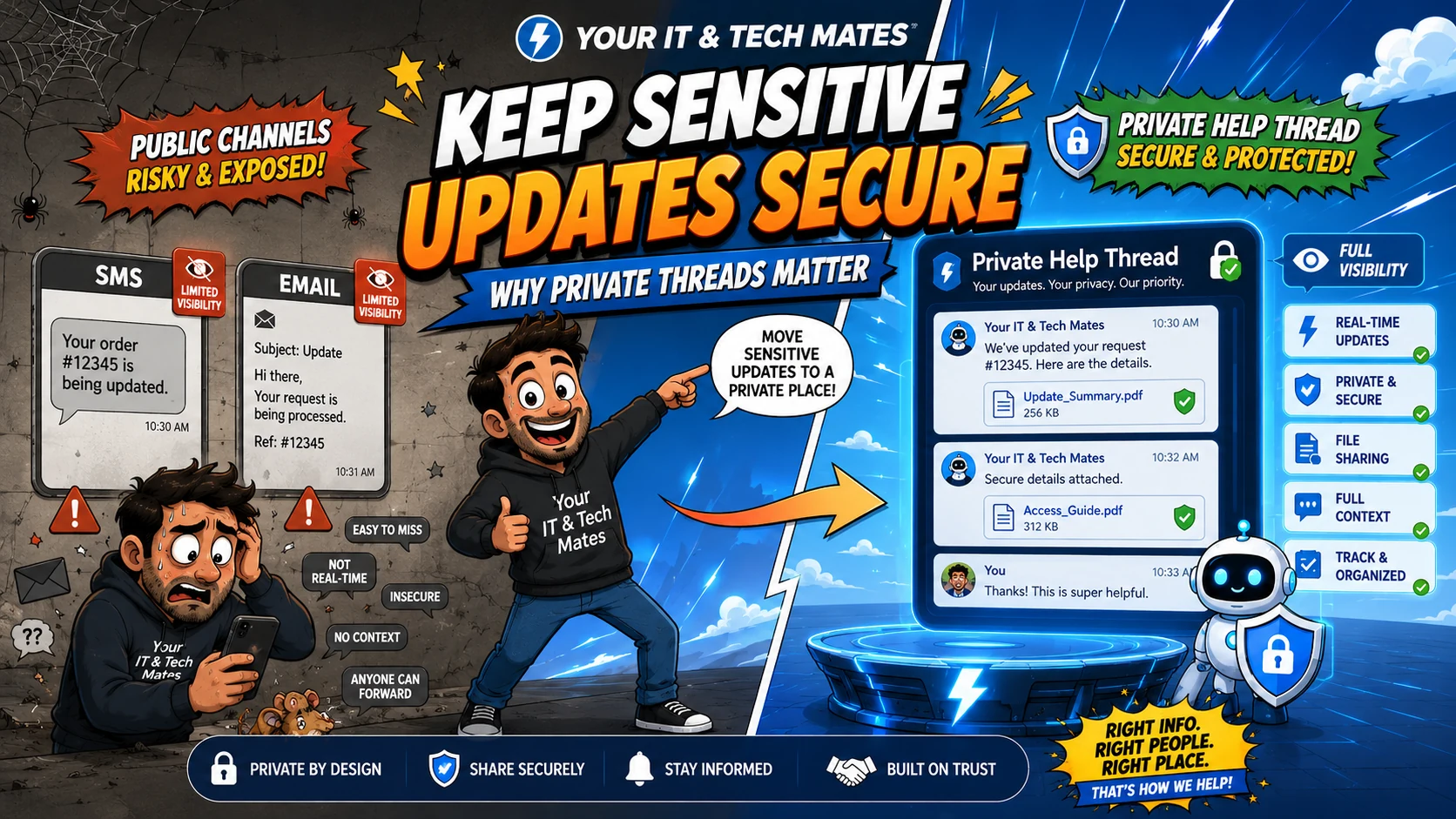
Quick answer
Start with the business workflow, not the software brand. Map where an enquiry begins, who owns the next step, what information must stay attached to the request, and where a human must review or approve the outcome before automating anything.
Use public communication channels for the minimum useful notification, then keep detailed support information in an authenticated customer thread. This reduces accidental disclosure, preserves context and gives both customer and staff one place to review the current request.
Tell us what is slowing your business down. QuoteMe gives Your IT & Tech Mates a structured starting point for a human review before any recommendation or paid work.
Start with QuoteMe →Why a notification channel is different from a work channel
SMS is designed for short messages and email is designed for broad interoperability. Both are useful, but neither automatically guarantees that a detailed support update remains attached to the right request, is viewed only by the intended person, or stays current after the situation changes.
A secure work channel can require the normal customer access checks and keep the complete conversation, files and request state together. That is a different job from simply notifying someone that an update exists.
Our rule: notify outside, explain inside
When a technician replies, the customer may receive an email or SMS notice. The notice can say that the request has an update and provide a safe way back to Private Help. It does not need to copy the technician’s full message into every transport channel.
That separation also reduces confusion. If the detailed response is edited, clarified or followed by another message, Private Help remains the place with the current chronological context.
What belongs in a secure thread
Send the smallest useful notification
Tell the customer that an update is ready; do not copy unnecessary sensitive detail into SMS or email.
Link to the correct request
The notification should return the customer to the authoritative request rather than start another conversation.
Verify access
Use the existing contact and one-time access checks before showing private request content.
Why this helps customer trust
Customers should not have to decide which of three different messages contains the authoritative answer. One secure thread gives them a clear place to return to, especially when the support process lasts more than one interaction.
It also helps staff. A technician can review the same thread the customer sees rather than reconstructing the history from forwarded email chains and screenshots of SMS messages.
Keep authentication proportionate
A secure customer thread still needs to be usable. Your IT & Tech Mates uses contact verification and one-time access mechanisms so customers can reach the correct Private Help thread without introducing a completely separate customer-account product for every request.
The principle is broader than one implementation: protect the sensitive details, minimise unnecessary friction, and keep the access boundary separate from ordinary notification channels.
Security should not become a marketing claim without controls
Calling a page “secure” is not enough. The workflow needs access checks, server-side validation, careful handling of public tokens, no accidental exposure in notifications, and human review for actions that affect quotes, payments or work approval.
Benefits and practical outcomes
The value is not adding more software. It is reducing the gaps between customer contact, staff review, follow-up and the next approved action.
Reduce accidental exposure
SMS and email carry only the minimum useful notification rather than detailed technician or quote information.
Keep full context together
Files, customer uploads, technician notes and quote-related messages stay attached to the correct secure thread.
Make the authoritative answer clear
Customers return to one current conversation instead of comparing forwarded emails and screenshots.
Preserve explicit approvals
Reading or replying to a notification does not automatically approve pricing, payment or paid work.
Example: laptop repair update with sensitive detail
A customer texts about a laptop repair. The technician later has diagnostic findings, photos and quote information to share. Rather than copying all of that into SMS or email, the customer receives a short notice that an update is ready. The detailed message and files remain in Private Help behind the normal access checks.
Outcome: convenient notifications for the customer, with the detailed service history kept in the correct protected conversation.
Practical workflow checklist
- Send the smallest useful notification. Tell the customer that an update is ready; do not copy unnecessary sensitive detail into SMS or email.
- Link to the correct request. The notification should return the customer to the authoritative request rather than start another conversation.
- Verify access. Use the existing contact and one-time access checks before showing private request content.
- Keep files and detailed context together. Technician notes, customer uploads and quote-related information should remain attached to the correct secure thread.
- Separate communication from approval. Reading or replying to a message should not automatically approve a quote, payment or paid work.
Key takeaways
- Give customers convenient entry channels without creating separate operational records for every channel.
- Keep one authoritative request, clear status and chronological conversation.
- Use SMS and email for concise transport and notifications; use Private Help for detailed or sensitive context.
- Keep quote scope, pricing, approval, payments and paid work under explicit human-controlled steps.
- Map the workflow before adding AI or automation.
Frequently asked questions
Is email insecure?
Email is useful, but it can be forwarded, viewed on multiple devices and separated from the current request context. That is why we keep sensitive support detail in the authenticated thread.
Why send any SMS or email at all?
Notifications reduce friction. They tell the customer that something is ready without requiring them to keep checking the service.
What information can stay in the notification?
Usually the request reference, a neutral status message and a secure entry link are enough. Avoid passwords, PINs, detailed technician findings and other sensitive content.
Can the customer still text a short reply?
Yes, when the SMS can be matched safely to the correct request. Longer or sensitive information should move back into Private Help.
Does Private Help replace the Customer Room?
It is part of the existing secure customer-help pathway. The goal is not to create another portal, but to keep the detailed conversation attached to the same request and access controls.
Need a safer customer-update workflow?
If your business currently sends detailed service information through scattered SMS and email threads, start with QuoteMe. Your IT & Tech Mates can review how notifications, secure customer access and staff follow-up could work together.
Related customer-workflow guides
One Customer Workflow: How We Connect SMS, Email, QuoteMe and Private Help
See how Your IT & Tech Mates connects SMS, email, QuoteMe, Quick Chat and Private Help into one small-business customer workflow without creating duplicate inboxes or tickets.
Read guideStop Losing Enquiries: Why SMS, Email and Website Forms Need One Workflow
Learn why disconnected SMS, email and website enquiries create missed follow-up for small businesses, and how one connected customer workflow reduces duplicate admin.
Read guideFrom Message to Quote: A Better Small-Business Customer Workflow
A practical Australian small-business workflow from first customer message to reviewed quote, using structured intake, one request history and secure customer follow-up.
Read guideText Without Chaos: How Customer SMS Can Feed a Real Business Workflow
See how customer SMS can become a trackable small-business help request with safe matching, acknowledgements and Private Help follow-up instead of another unmanaged inbox.
Read guideWant to connect a messy customer workflow?
Start by mapping where enquiries arrive, where the authoritative customer record lives, and which steps genuinely need integration or automation.